EU legal guarantee guides
How to add the EU legal guarantee notice to a Shopify store
Three ways to put the harmonised EU legal guarantee notice on Shopify product pages: an image block, theme code, or an app. What each one takes, and how to check the result.
Last reviewed: · Transactful
From 27 September 2026, a Shopify store that sells goods to consumers in the EU must show the EU legal guarantee notice before purchase. Shopify does not add it for you. There are three ways to do it.
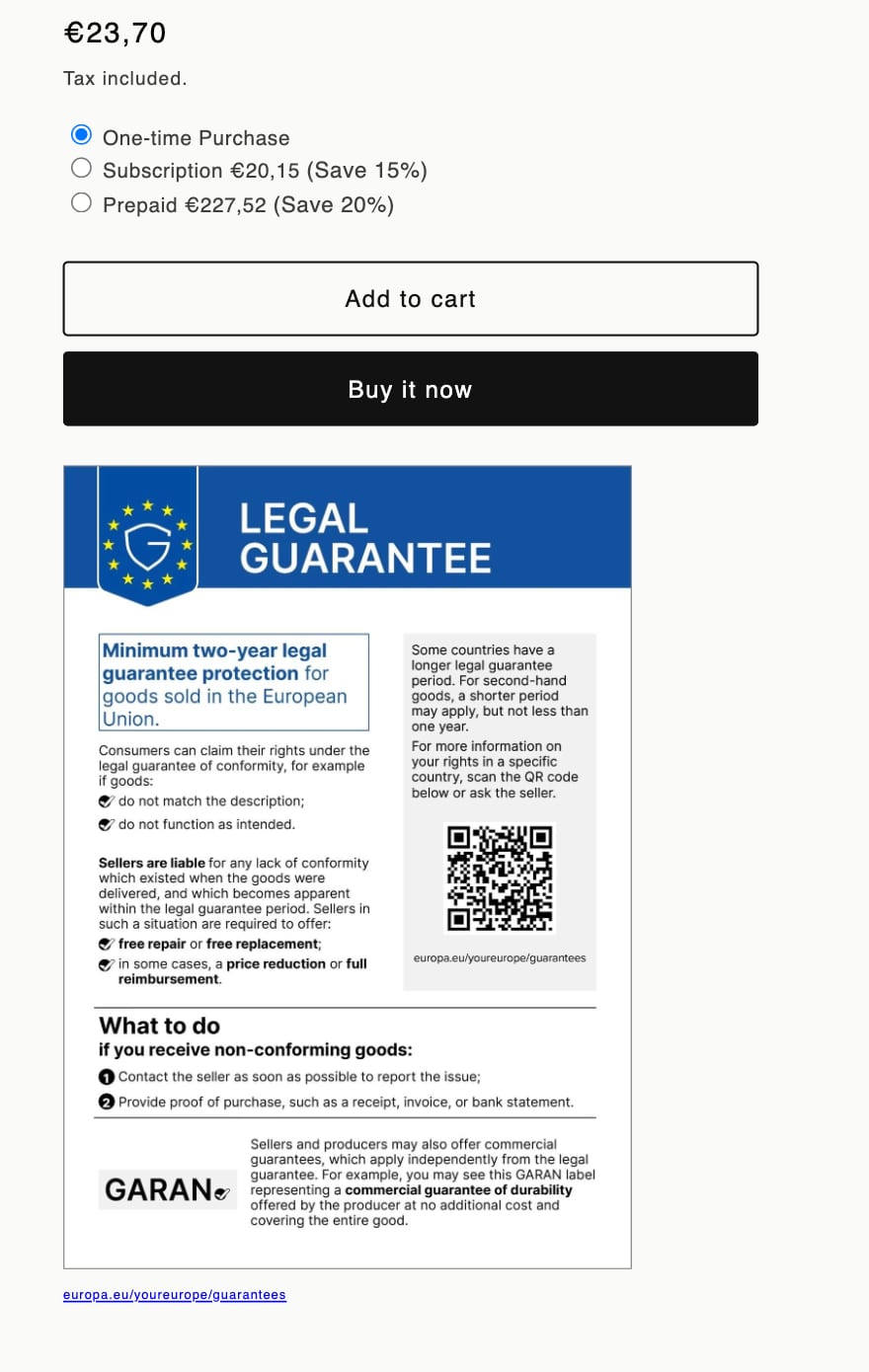
Option 1: an image block in the theme editor
Good for a store that sells in one language only.
- Download the official notice in your language from the annex of Regulation (EU) 2025/1960 on EUR-Lex.
- In Shopify, go to Online Store → Themes → Customize and open a product page.
- In the product information section, click Add block. Use an Image block if your theme has one. If it does not (Dawn, for example), use a Custom Liquid block with an
<img>tag that points to the notice in Content → Files. - Drag it under the Buy buttons. Click Save.
- Repeat for every product template your store uses.
Limits: one language for every shopper; a new block for every template; the notice must be in colour, and the QR code must scan at the size you choose; nothing tells you if the block is removed later.
Option 2: your own theme code
Good for a developer who wants full control.
- Upload each language version of the notice to Content → Files.
- In your product section, add a snippet that picks the file from the shopper’s language, for example from
request.locale.iso_code, with a fallback language. - Render it below the buy buttons, in colour, with alt text and a link to the EU’s guarantee pages.
- Test every language your store publishes, on desktop and mobile.
Limits: you own the code through every theme update and theme change; 24 files to keep; the GARAN label needs product metafields and more code.
Option 3: a Shopify app
Good for most stores, and for any store that sells in more than one language.
Assay is a Shopify app for exactly this job:
- the official notice from the Official Journal, never redrawn;
- all 24 EU languages, matched to each shopper’s storefront language, with a fallback you choose;
- an app block for the product template, or an app embed that places it after the buy button in any theme;
- a check that the notice is on your product pages;
- optional GARAN labels, only on products with a qualifying producer guarantee;
- no storefront calls to outside servers: the artwork is served by Shopify’s CDN.
The free plan covers the mandatory notice on unlimited products. Install Assay, then follow the setup guide.
Compare the options
| Image block | Theme code | Assay | |
|---|---|---|---|
| Languages | One | As many as you build | All 24, automatic |
| Setup time | 10 minutes per template | Hours | About 5 minutes |
| Tells you when the notice is missing | No | No | Yes |
| GARAN labels | No | With extra code | Yes |
| Cost | Free | Developer time | Free plan |
Check the result
- Open a product page as a shopper, not in the editor.
- Switch the storefront language and check that the notice follows.
- Check on a phone that the text is readable and the link works.
- Check a product on every product template.
- If you show GARAN labels, check one product that has a label and one that does not.
Next: read about the GARAN label and what the regulation requires.
Frequently asked questions
Does Shopify add the EU legal guarantee notice for me?
No. Shopify themes do not include the notice. You add it with a theme block, your own theme code, or an app.
Which Shopify page should the notice go on?
The product page, before the buy button, so that the consumer sees it before they buy. Some shops also show it in the cart, but the product page is the main place.
My store sells in several languages. Do I need several notices?
Yes. Show the official notice in the language the shopper sees. The EU publishes it in all 24 official languages.
Can I make the notice smaller or change its colours to match my theme?
You can choose its size, as long as it stays readable and its QR code still scans on a phone. You cannot change its text, colours or layout: the regulation says none of its elements may be edited, and online it must be in colour.
Do I need the notice if I only sell in my own EU country?
Yes, if you sell goods to consumers. The rule applies to every sale to a consumer in the EU, including sales in your own country.
Sources
This guide summarises EU and national law for online sellers. It is not legal advice. Check the sources, and ask an adviser about your own business.