
Everyday use
Bulk apply
Set GARAN years and brand on many products at once, keep new products labelled with rules, follow each change, get the result by email, and clear it.
Bulk apply sets the GARAN fields on many products in one step. It is part of Assay Professional. On other plans, the cards explain what they do and link to the plans; you can still set labels one product at a time.
In Assay, open Durability labels. There are two ways to change many products.
For one producer: add a producer’s guarantee
Use this when one producer guarantees its products for the same number of years.
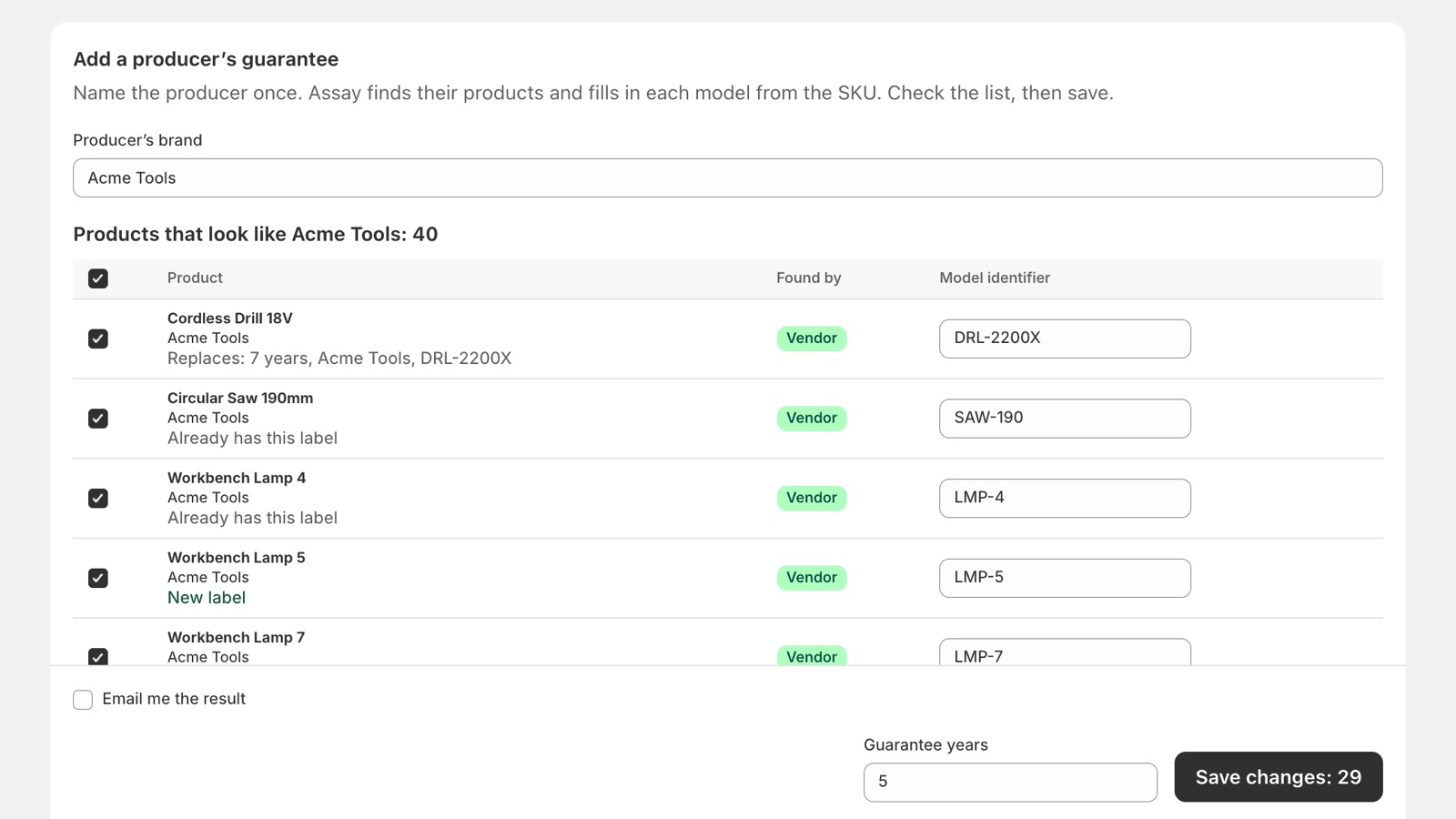
- In Add a producer’s guarantee, type the producer’s brand, or pick it from Brands in your shop.
- Assay lists the products that look like that producer’s: those with it as their vendor, and those with it in their title. Untick any that are not.
- Check each model identifier. Assay fills it in from the SKU; change it where the SKU is your own stock code and not the producer’s model number.
- Enter the Guarantee years: 3 or more.
- Click Save changes.
For a collection or a tag: apply to many products
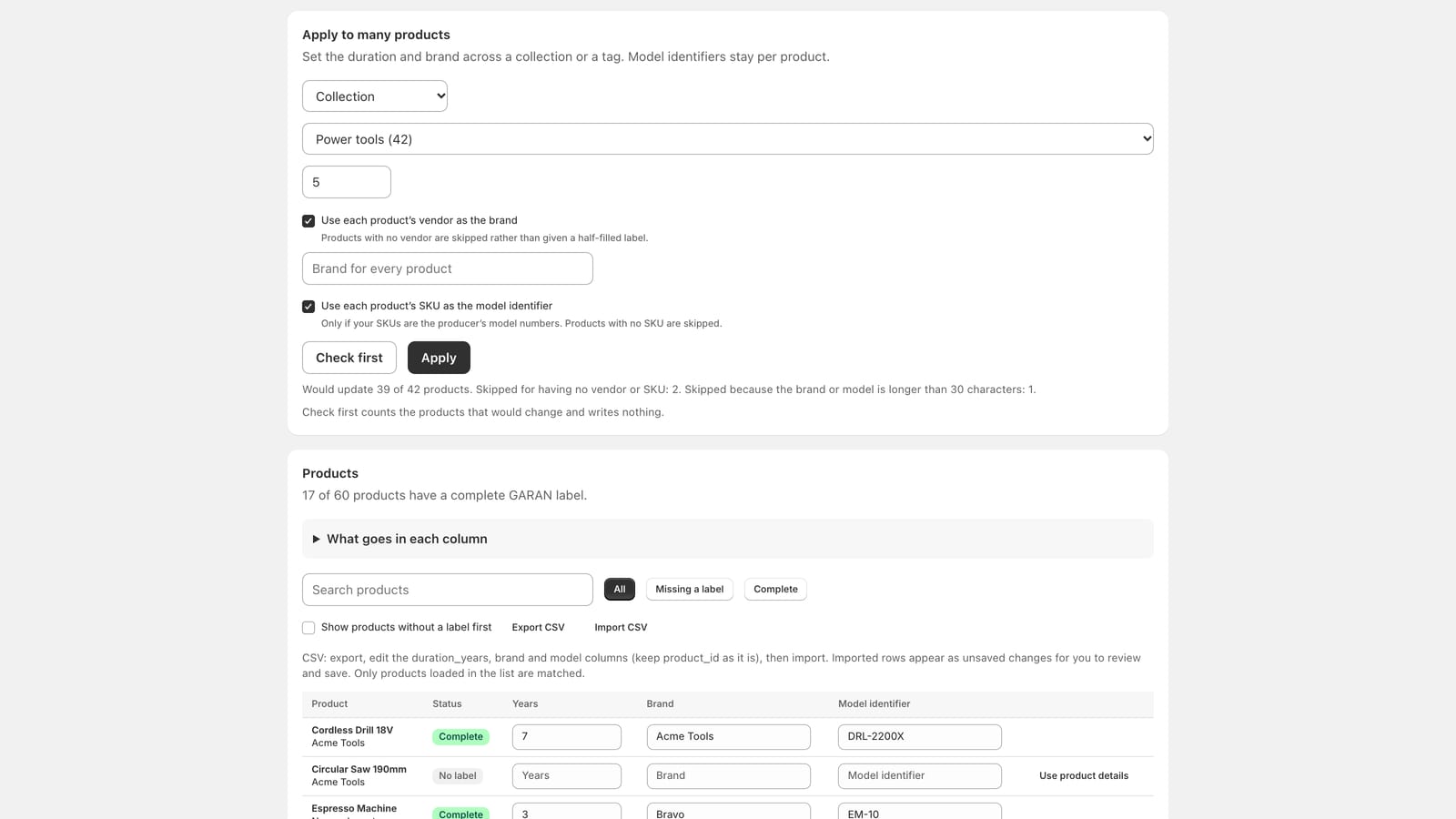
- In Apply to many products, choose Collection or Tag, then which one.
- Enter the Guarantee duration in years: 3 or more.
- Choose the brand:
- Use each product’s vendor as the brand (on by default). Products with no vendor are skipped rather than given a half-filled label.
- Or turn it off and type one Brand for every product.
- Optional: Use each product’s SKU as the model identifier. Only if your SKUs are the producer’s model numbers. Products with no SKU are skipped.
- Click Check first. It counts the products that would change, says about how long it will take, and writes nothing.
- If the result looks right, click Apply.
Keep labels up to date for new products
A rule labels the products you add later, the same way. Both ways above have a box, Keep this up to date for new products. Tick it before you save, and Assay makes a rule from the same values:
- From Add a producer’s guarantee: new products with that producer as their vendor get the same years and brand, and the model from their SKU.
- From Apply to many products: new products in that collection, or with that tag, get the same years and brand, and the model from the SKU if you chose that.
Tick it only if you are sure the producer gives this guarantee on its future products too. A rule states a guarantee for products you have not seen yet, and a label with no real guarantee behind it is a misleading claim.
What a rule does:
- It fills empty labels only. A product that already has any GARAN value, set by you or by anyone else, is left alone. Assay asks Shopify to write each field only if it is still empty, so a value typed while Assay works is never overwritten.
- It runs when a product is created, a few seconds later, and once a day for products changed since the day before. The daily run catches collection rules and products whose vendor or tags change later.
- Each run is a change on Bulk changes, named after the rule, for example 5 years on new products (Vendor: Bosch). You can open it, see each product, and clear it like any other change.
- A product the rule cannot label, for example with no SKU, is listed as Skipped with the reason. A run with nothing to change does not appear.
- When two rules match a product, the older rule decides.
Your rules are listed under Rules for new products on Durability labels, oldest first. Pause stops a rule until you resume it; Delete removes it. Neither changes the labels it already wrote; clear those on Bulk changes. Pause and delete work on every plan. If you move back to Free, your rules stop until you upgrade again.
Tick Email me a weekly summary of what rules labelled to get one email a week with the count for each rule. It is sent only in a week when a rule labelled something.
While it runs
Assay makes the change in the background, through Shopify’s own system for large updates. You can close Assay, or your browser, while it runs.
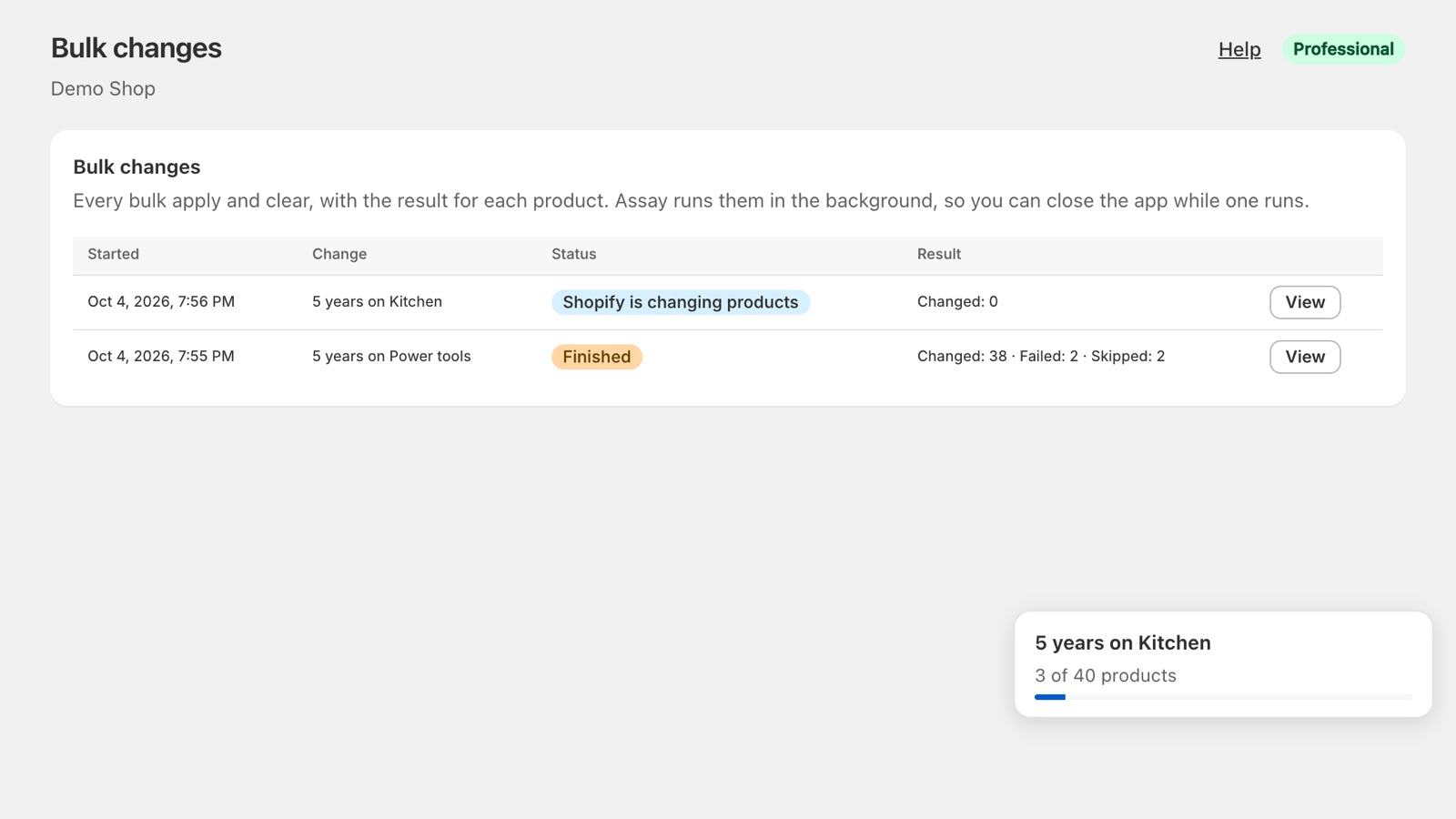
- A panel in the lower right corner shows the change and how far it has got, for example 677 of 997 products. Click it to open the change.
- Bulk changes lists every change, with its status and its result.
- A few hundred products usually take under a minute.
Get the result by email
Tick Email me the result before you start any change: bulk apply, a producer’s guarantee, a clear, or a retry. Assay fills in the address you saved, or your shop owner’s. Tick Remember this address to use it next time.
For a change that Assay expects to take more than two minutes, Assay asks before it starts: Start and email me, or Start without email.
The email says how many products changed, lists any that could not be changed with the reason, and links to the change in Assay. It comes from [email protected].
What it changes, and what it does not
- It sets years and brand on every product in scope, and the model identifier only if you chose to take it from the SKU (or, for a producer’s guarantee, the models you checked).
- Without the SKU option, model identifiers stay exactly as they are on each product. A product that already had its model set ends up with a complete label; one without stays Incomplete until you add the model.
- Products are skipped, never half-written, when the vendor or SKU you asked for is missing, or when the brand or model would be longer than the label’s 30 characters.
- If someone edits a product in Shopify after Assay read it, Assay does not overwrite that edit. The product is listed as failed, with that reason.
When products could not be changed
A red banner at the top of Assay names the change and how many products failed. Open the change to see each product and why. Try the failed products again sends only those products again; the others are already done.
Clear a bulk change
Open the change on Bulk changes and click Clear this change:
- It removes only the fields that change wrote.
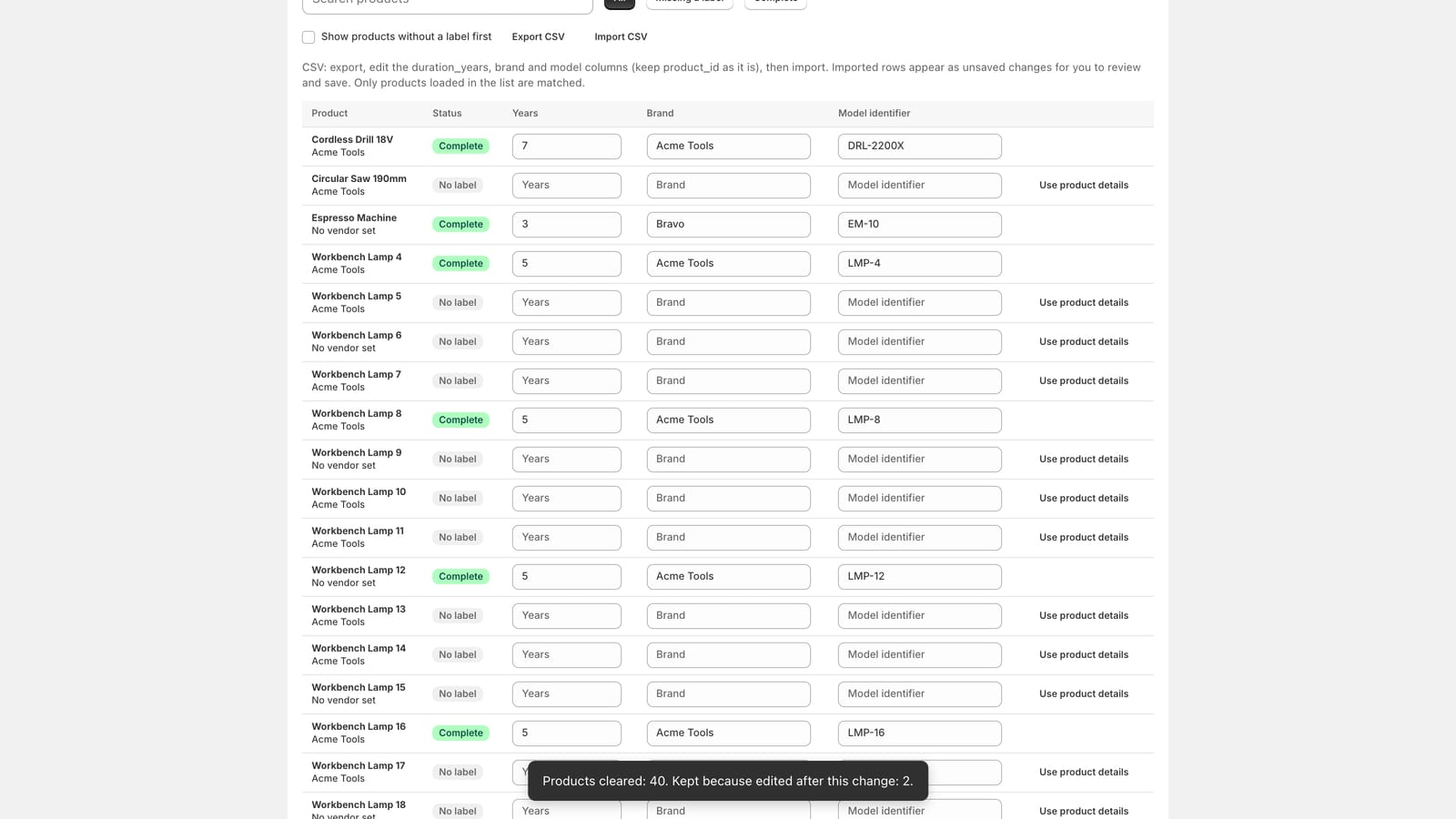
- It leaves alone any field you have edited since. The result lists those products under Kept.
- It clears; it does not restore what was there before, because Assay does not keep a copy.
- A change can be cleared once. Afterwards it shows Cleared, with a link to the clear.
Assay keeps the record of each change for at least 90 days.
Not answered here? Email [email protected] with your shop's myshopify.com address. We usually reply within one business day.